Remap or disable keysShow Access KeysSpecial settings
Settings 🡢 keyboard 🡢 -> press F12 if not all settings are shown 🡢 Show Access Keys
E.g. in Word you can access the ribbon by keyboard. Press and release the Alt key. The access key are shown. This works in some other applications, too — but in most it does not.
With Clipboard Master you can have that in most of the applications, e.g. in the Windows Settings:

Press and release the Alt key and then press the according key.
Edit the access keys
A right click at a shown accesskey shows a context menu:
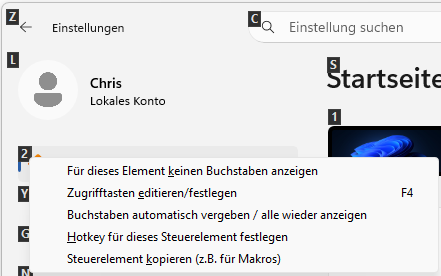
Select one of these options:
- Do show a letter for this control
- Edit access keys
- Reset, show all
- Assign automatically / show all
- Define hotkey for this control (e.g. Button, Link)
- Copy control for macro