Select an addressAddress Wizard - add addressKeyboard
(Version 5.6.0 or newer)
Copy an address
- Select an address (text) and copy it (e.g. Ctrl + C).
- Select a contact in Outlook and copy it (e.g. Ctrl + C).
Via Drag & Drop:
Drag and drop a contact from Outlook or Thunderbird to the Address Wizard window.
Drag and drop aone or multiple vcf-file(s) (VCard-file) to the Address Wizard window.
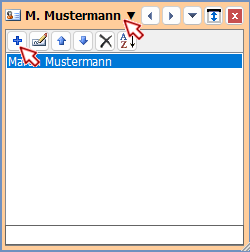
Add manually
Activatge the Address Wizard and press Ctrl + N.
Or click at the top at the name. Now the list with all contacts is shown with a button bar. Cliock at the + button.